I fired iMessage as the keeper of my messages
Messages has filled up every Mac I've owned, and then it filled up my iCloud. So I built my own backup with Claude Code and finally turned on the setting that clears out old messages.
I've kept every iMessage I've sent since December 2017, almost half a million of them, and the Messages app has been the biggest thorn in my side on every Mac I've owned.
The problem
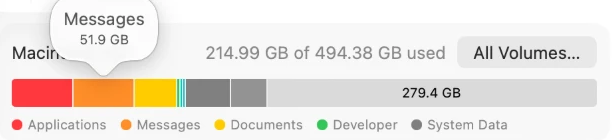
Every Mac I've owned has filled up, and every time the problem was the same app. A mid-2010 Mac mini, an M1 Mac mini with a 256 GB drive, a MacBook Pro, an M4 Pro MacBook Pro with 512 GB, an M4 Mac mini with 512 GB, and now an M4 MacBook Air. Even five years ago my Messages library was over 100 GB. By this year it was about 200 GB on a Mac mini with a 512 GB drive, so 40% of my drive was going to a chat app.
So I played storage tetris. Once the disk filled up I couldn't move files around or unpack a project, so I'd shuffle projects off to external drives, clear caches, and delete apps to make room.
I tried turning off Messages in iCloud on the Mac and deleting the local copy, and I did that more than once, but then my old conversations weren't on my Mac anymore, and I need them there. So every time, I turned it back on and let it eat the drive again.
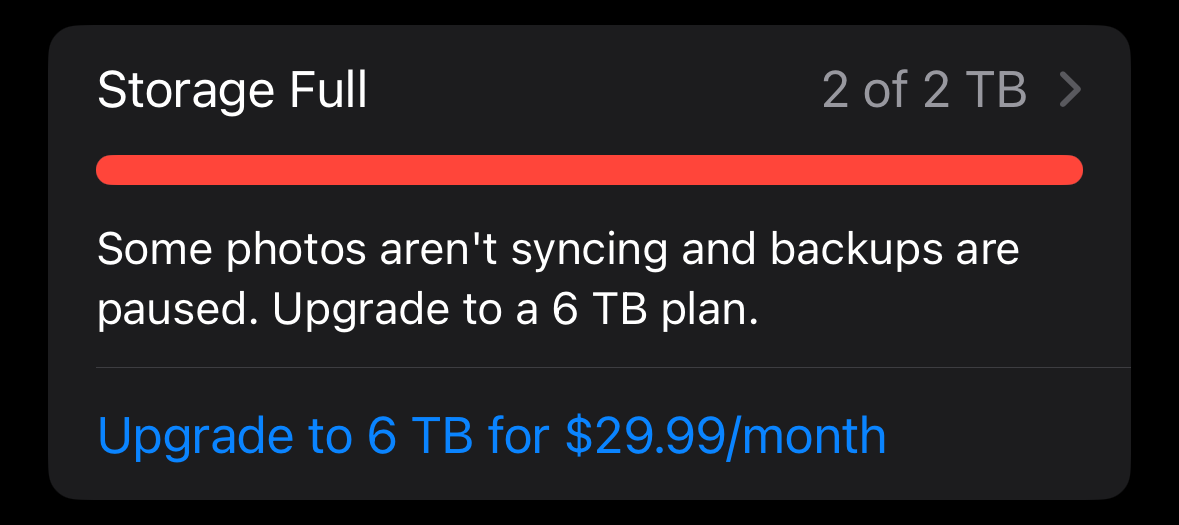
Then in September, my iPhone told me my iCloud storage was full. Photos had stopped syncing, my backups were failing, and Apple's fix was a 6 TB plan for $29.99 a month.
The cause
Messages is the worst piece of software in Apple's entire system, and I say that as someone who wrote a whole post about how bad shared albums are in Apple Photos.
It has to live on your internal drive
Photos at least lets you move your whole library to an external drive. Messages lives on your internal SSD or it doesn't live on your Mac at all. If you send a lot of photos and videos, that gets very expensive very fast.
It stores everything twice
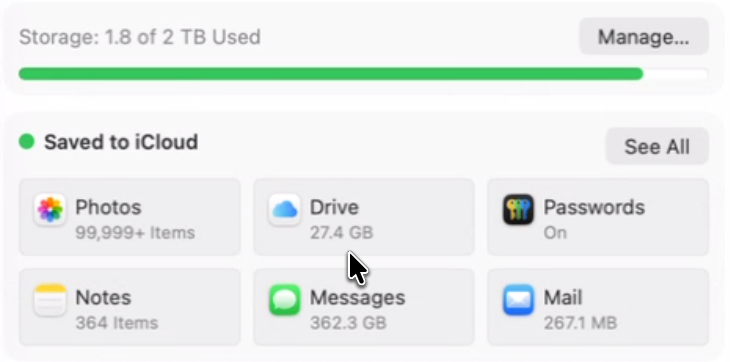
When I finally dug into the database, I was horrified. Messages keeps its own full copy of every photo and video you send, even when that exact file is already in your Photos library, and both copies count against your iCloud storage. Maybe I'm dumb for thinking this, but duplicate a file in Finder and it takes up no extra space, so I assumed Apple was doing something similar here.
I send almost every photo of my kids through Messages, because my parents and my grandma have a hard time even finding shared albums, let alone opening them. I matched the videos I'd sent against my Photos library, and by filename about three out of four were already in there, which is over 46 GB of video that looks like a straight duplicate.
To make matters worse, Messages doesn't even share files with itself. If I send the same video to my wife and then to my parents, it gets stored twice. Videos I'd sent more than once, with the same name and the exact same size, added up to almost 7 GB of extra copies in the last year alone.
You can't clean it up
There's no "remove attachments already in Photos" button, and there isn't even a "keep my texts but clear out old media" setting, which is the one everyone with a full drive actually wants.
What you get is Keep Messages: 1 Year, which deletes the text along with the media on every device at once. Nine years of conversations with my family take up a few hundred megabytes, so I wasn't going to throw those away to get rid of duplicate videos.
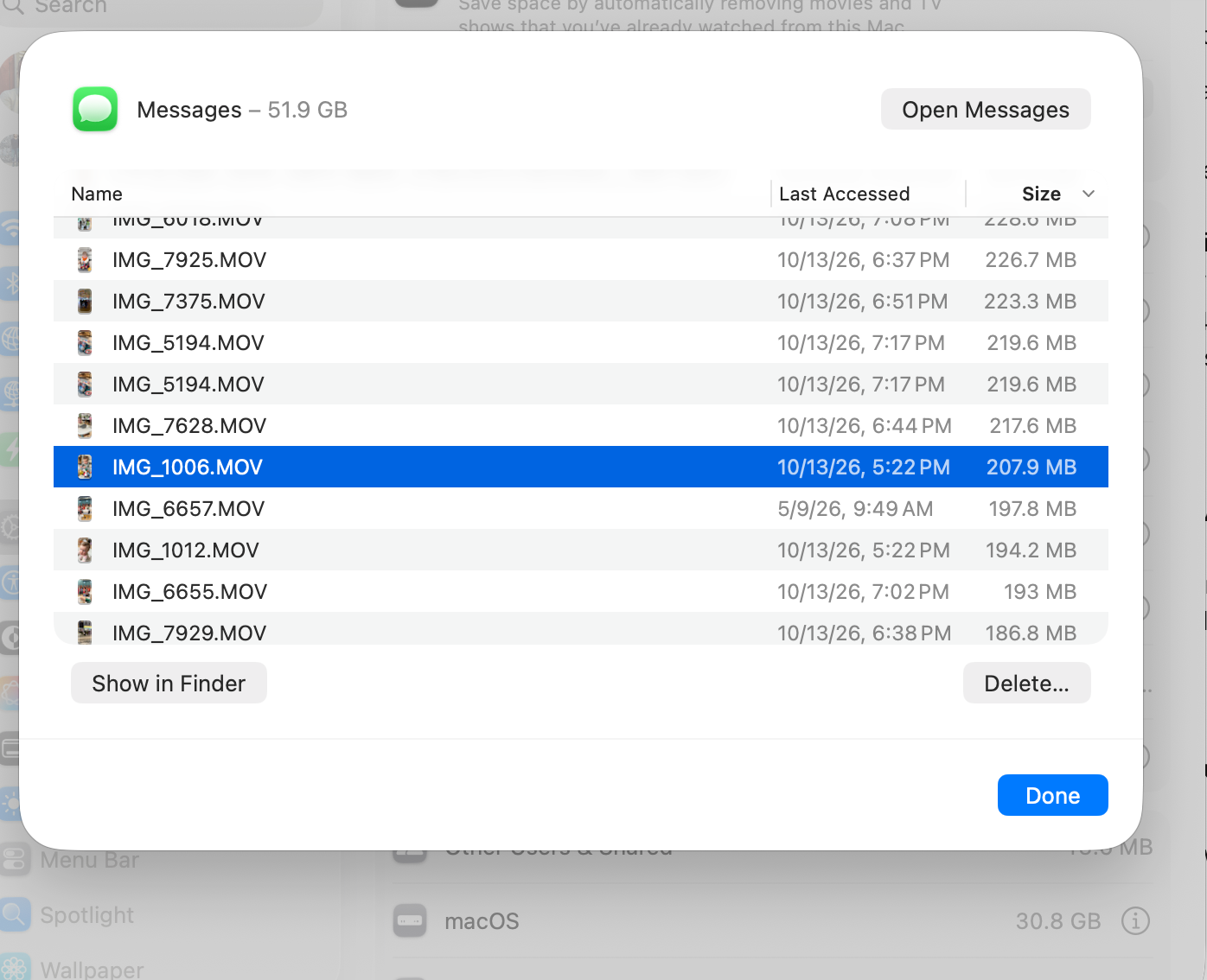
The other option is General → Storage → Messages in System Settings, which is a flat list of filenames. You can't see who sent it, which conversation it's from, or whether it's already in Photos. IMG_5194.MOV shows up twice in my list, 219.6 MB each, and nothing tells you why.
You can't back it up
At least with Photos I can use Parachute Backup and know my library is safe somewhere I control. For Messages, Apple doesn't offer anything. There's no export. Time Machine only backs up what's actually on your Mac, and Messages leaves most attachments in iCloud, so my Mac mini only had about 31 GB of nearly 200 GB on disk. An iPhone backup is just a copy of what's on the phone today, replaced by the next one.
You can't find anything
Messages search works if you know who you're looking for. The hard ones are things like the babysitter we used a year ago, or the window repair guy we had out 18 months ago, where I don't know the name, which is the whole reason I'm searching. So I search for "babysitter" across nine years of texts, and I can't narrow it to a year or see the messages around a result to tell if it's the right one. It's so bad that scrolling my full history on a big screen was the only way I stood a chance of finding anything, which is why I kept letting it eat my drive.
The solution
I didn't start from scratch. imessage-exporter is a great open-source tool that reads Apple's Messages database and turns it into readable web pages. I used Claude Code to modify it into the backup I wanted, and it came together in a single evening.
The issue with an exporter on its own is that every run is a snapshot of whatever is on your Mac that day, so once you turn on Keep Messages: 1 Year, the next export only has one year in it. So the main change was making it a weekly update, where each update is just the new messages instead of the entire library. Each week's new messages, photos, and videos go into one pool of original files, and nothing ever gets overwritten or deleted.
The first full backup came to 46,797 attachments, 197 GB, and 486,334 messages. iCloud says Messages takes up 362 GB, and I have no idea what the other 165 GB is. Claude can't write to my external drives, because they hold my video archive, so I ran that first backup in Terminal myself.
One copy on one drive isn't a backup, so it lives in four places: my main archive drive, a second drive, a cold drive at my office, and Google Drive, encrypted before it leaves my Mac so Google can't read any of it.
Then I had Claude build a search index of every message back to 2017, updated every night. That Mac mini also runs Claude Code, so I can just ask it from my phone, my laptop, or the office: "Find the babysitter we used last year." The index never leaves my Mac mini, and only the handful of matching messages go to Claude to write the answer.
How it's working
Before I turned on Keep Messages: 1 Year, Claude compared every message older than a year, 432,297 of them, against the backups, one by one. None were missing, and none had different text.
Then I flipped the switch. My Mac went from 486,683 messages to 54,386, and the Messages folder went from about 200 GB to 52 GB. In iCloud, Messages dropped from 362 GB to 91 GB. The setting applies everywhere at once, so I got space back on all three Macs I use every day.
Search has been the real surprise. I've used it at least three times for things I never thought I'd find again, and it found every one. Once Claude can actually see the data, it's incredibly good at digging things up.
The backups have been boring, which is what you want. The weekly run takes under 30 seconds because it only copies what's new. Google Drive is the slow part, six or seven hours for under 1 GB, but it runs overnight so I never notice.
Ultimately, Apple treats Messages as a chat app, but for me it's become the record of my family's life, my kids growing up, conversations with my parents, nine years of small things I'll want to find someday. Now I have a copy of it that I control.